


No products in the cart.

Essential guidelines and best practices for creating CDR files compatible with leather production processes and design workflows across all platforms.
CDR, which stands for CorelDRAW, is a proprietary file format used extensively in the leather industry for design and pattern creation. This vector-based format allows leather manufacturers, designers, and craftspeople to create precise technical drawings, cutting patterns, and decorative designs that can be scaled without loss of quality. In leather production, CDR files serve as the digital blueprint for products ranging from footwear and handbags to upholstery and automotive interiors. The format preserves detailed information about curves, shapes, and dimensions that are critical when working with leather materials, where precision directly impacts material waste and final product quality.
The widespread adoption of CDR format in leather workshops stems from CorelDRAW's powerful vector editing capabilities and its intuitive interface for creating complex patterns. Unlike raster image formats that store information as pixels, CDR files contain mathematical descriptions of shapes, making them ideal for laser cutting machines, CNC routers, and digital printing equipment commonly used in modern leather production facilities.
In the leather industry, CDR files serve multiple essential functions throughout the production process. Pattern makers use this format to develop standardized templates for cutting leather pieces, ensuring consistency across batches and minimizing material waste. The precision offered by vector graphics is particularly valuable when creating patterns for complex items such as shoes, where multiple leather components must fit together perfectly.
Designers utilize CDR format for creating embossing patterns, embroidery guides, and decorative elements that will be applied to leather surfaces. The format's ability to handle both simple geometric shapes and intricate artistic designs makes it versatile for both functional and aesthetic applications. Additionally, CDR files are commonly used for creating branding elements, logos, and custom artwork that will be hot stamped, laser engraved, or printed onto leather products.
Manufacturing facilities integrate CDR files directly with automated cutting equipment, where the vector paths guide precision cutting tools to maximize leather utilization and reduce production time. This digital workflow allows for rapid prototyping and easy modification of designs without the need to recreate physical patterns.
When working with CDR format in leather production, several technical aspects require attention. File compatibility is a primary concern, as CDR files created in newer versions of CorelDRAW may not open properly in older software versions. Leather professionals often need to save files in legacy formats or export to universal vector formats such as AI, EPS, or PDF to ensure compatibility across different production systems and with external partners.
Proper layer organization within CDR files is crucial for efficient leather production. Designers typically separate cutting lines, fold lines, stitching guides, and decorative elements into distinct layers, allowing production staff to isolate specific information for different manufacturing steps. Color coding is another standard practice, where different line colors indicate different operations such as cutting, scoring, or marking.
Scale accuracy is paramount when creating CDR files for leather work. Unlike digital designs that remain on screen, leather patterns must translate to physical dimensions with absolute precision. Designers must ensure that their CDR files are created at actual size or with clearly documented scale ratios to prevent costly errors in material cutting.
Product purchase offer: Leather Phone Case Pattern
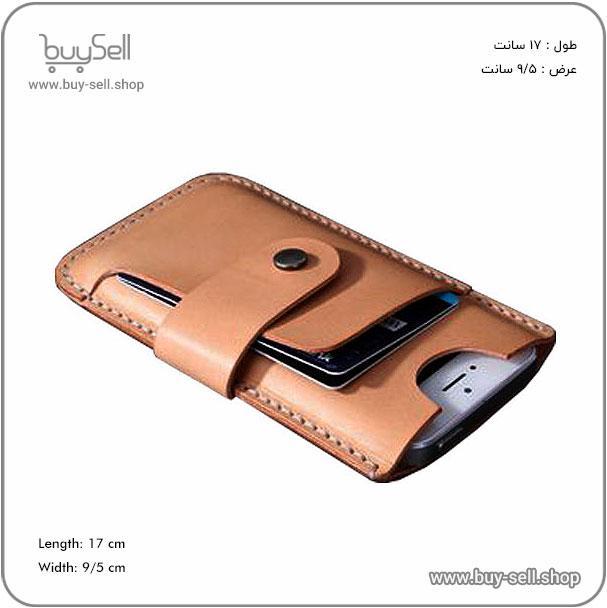
The CDR format offers significant advantages for leather industry professionals, including excellent control over bezier curves and nodes, which is essential for creating the organic shapes common in leather goods. The format supports extensive color management, important for visualizing finished products and coordinating with dyeing processes. Additionally, CorelDRAW's integration with various output devices makes it compatible with most modern leather cutting and marking equipment.
However, the proprietary nature of CDR format presents challenges. Not all design software can open or edit CDR files natively, which can complicate collaboration with clients or partners using different design platforms. File corruption can occur, particularly with complex designs containing numerous nodes and effects. To mitigate these risks, leather professionals should maintain backup copies in multiple formats and periodically convert critical designs to more universal vector formats for archival purposes.
Understanding CDR format's role in the leather industry enables designers and manufacturers to leverage digital tools effectively, streamline production workflows, and maintain the high precision standards required for quality leather craftsmanship.
Preparing artwork files for leather engraving, embossing, or printing demands specific technical parameters to ensure optimal results. Vector files, particularly those saved as AI, EPS, or PDF formats, provide the scalability necessary for leather applications of varying sizes without losing image quality. These formats preserve clean lines and sharp edges crucial for detailed leather work. Raster images should be submitted at a minimum resolution of 300 DPI (dots per inch) to prevent pixelation when transferred onto leather surfaces. For large-format leather products such as upholstery panels or wall hangings, designers should consider even higher resolutions to maintain clarity. The file format selection directly impacts the precision of laser engraving equipment and the clarity of heat-pressed designs, making this foundational requirement non-negotiable for professional leather customization.
Leather production workflows require specific color mode configurations depending on the application method. For foil stamping and embossing processes, files must be converted to pure black vector artwork, as these techniques rely on pressure and heat rather than color variation. Digital leather printing necessitates CMYK color mode rather than RGB, ensuring accurate color reproduction on leather substrates that absorb ink differently than paper or fabric. Designers should understand that leather's natural texture and varying dye absorption rates can alter perceived colors, making it essential to request physical samples when color accuracy is critical. Pantone matching systems offer more consistency for branded leather goods, though availability depends on the production method. Spot color files should clearly separate each color onto individual layers, allowing manufacturers to adjust stamping dies or printing plates accordingly.
The physical properties of leather impose limitations on the level of detail achievable in custom designs. Line weights below 0.5 points may not reproduce reliably, particularly on textured or full-grain leather surfaces where natural variations can obscure fine details. Laser engraving systems typically handle finer details than traditional embossing methods, but even advanced equipment struggles with intricate patterns containing elements smaller than one millimeter. Text requirements present additional challenges, with most leather workers recommending minimum font sizes of 8 points for sans-serif typefaces and 10 points for serif fonts to ensure legibility. Overly complex designs with excessive fine lines or intricate negative spaces should be simplified before production to avoid disappointing results. Designers must balance aesthetic ambitions with the technical realities of working with a natural, variable material that responds differently than synthetic substrates.
Product purchase offer: Leather shoulder bag and wallet set pattern

Several recurring technical mistakes compromise leather production quality and efficiency. Submitting files with embedded images rather than outlined text causes font substitution issues when manufacturers lack the original typefaces, resulting in altered designs. Failing to expand strokes to fills creates inconsistencies in line weights during scaling operations, particularly problematic for precision leather cutting. RGB color modes in files intended for printing generate unexpected color shifts when automatically converted to CMYK during production setup. Designers frequently overlook bleed and safety margin requirements, positioning critical elements too close to cut lines and risking their removal during trimming operations. To prevent these issues, always convert text to outlines, expand all strokes, verify color modes match the production method, and maintain at least a three-millimeter safety margin from all edges. Requesting a production-ready checklist from your leather manufacturer before file submission eliminates most compatibility problems and reduces revision cycles that delay project timelines.
Color management is a critical component when creating digital designs for leather products. The process involves ensuring that colors remain consistent across different devices, software applications, and production methods. In leather manufacturing, accurate color representation is essential because leather naturally exhibits variations in texture and absorption rates that affect how dyes and finishes appear on the final product. Digital designers must account for these variables by implementing proper color profiles and working within standardized color spaces such as CMYK for print applications or Pantone systems for precise color matching. When creating vector artwork for laser engraving, embossing, or cutting leather, establishing a reliable color workflow prevents costly production errors and ensures that the final leather goods match client expectations.
Vector graphics provide the foundation for scalable, production-ready leather designs. Unlike raster images that lose quality when resized, vector files maintain crisp edges and precise paths regardless of scale, making them ideal for everything from small leather keychains to large upholstery panels. When preparing vector files for leather applications, designers should convert all text to outlines to prevent font substitution issues during production. Stroke weights must be clearly defined and appropriate for the manufacturing method, as laser cutters and embossing machines require specific line thicknesses to function correctly. All artwork should be created in actual size or at a consistent scale ratio to avoid confusion during the production phase. Designers should also ensure that all paths are closed and properly merged, eliminating any overlapping elements that could cause errors in cutting or engraving equipment.
Selecting the appropriate color mode is fundamental to achieving accurate results in leather design projects. RGB color mode is suitable for digital presentations and online product catalogs, but production files should typically be converted to CMYK before printing on leather or synthetic materials. For specialized applications such as screen printing or digital printing on leather, designers may need to work with spot colors or custom Pantone references that account for how leather absorbs and reflects pigment differently than paper or fabric. Embedded color profiles, such as ICC profiles, help maintain consistency between what appears on screen and what emerges from production equipment. Designers should calibrate their monitors regularly and work in color-managed applications to minimize discrepancies. When submitting files to manufacturers, include detailed color specifications and reference samples whenever possible to bridge the gap between digital intent and physical outcome.
Several frequent errors can compromise leather design projects if left unchecked. One prevalent mistake involves using low-resolution raster images embedded within vector files, which defeats the purpose of creating scalable artwork. Designers sometimes forget to expand appearance attributes or flatten transparency, leading to unexpected results when files are opened in different software versions or sent to production equipment. Another common issue is failing to account for leather grain direction and natural imperfections that may affect how designs appear on finished products. To maintain quality standards, implement a comprehensive preflight checklist before finalizing any design file. This checklist should include verifying that all colors are correctly defined, confirming that stroke weights meet production specifications, checking for stray points or hidden objects, and ensuring that the artboard dimensions match the intended production size. Request test samples whenever possible, especially when working with new leather types or unfamiliar production methods, as this allows for adjustments before committing to full production runs.
Effective layer organization and naming conventions are fundamental practices in leather design and manufacturing workflows, particularly when working with digital design software, technical specifications, and production documentation. A systematic approach to organizing and labeling different layers of information ensures consistency, reduces errors, and facilitates collaboration among designers, pattern makers, and production teams. Whether managing digital leather patterns, technical drawings, or material specifications, clear naming conventions streamline communication and enhance efficiency throughout the entire production process.
Layer organization refers to the systematic arrangement of different design elements, pattern pieces, and technical information into distinct, manageable groups. In leather working contexts, layers typically separate various aspects such as cutting lines, stitching guides, grain direction indicators, hardware placement markers, and annotation notes. Each layer serves a specific purpose and can be toggled on or off depending on the task at hand. For instance, a pattern maker may only need to view cutting lines and seam allowances, while a production supervisor requires visibility of all layers including material specifications and assembly instructions. This hierarchical structure prevents visual clutter and allows team members to focus on relevant information without distraction from unnecessary details.
The concept extends beyond digital design files to physical organization as well. In traditional leather workshops, layer organization might refer to how pattern templates are categorized, how leather hides are sorted by grade and thickness, or how finished components are arranged during assembly. Regardless of the medium, the underlying principle remains consistent: grouping related elements together creates a more navigable and efficient workspace.
Naming conventions are standardized systems for labeling files, layers, and components in a consistent and descriptive manner. A well-designed naming convention immediately communicates essential information such as the item type, version number, date, or specific component function. For leather design files, effective names might include prefixes indicating the product category, followed by specific identifiers for the pattern piece, and suffixes denoting the layer type. For example, a layer might be named "BAG_FrontPanel_CuttingLine" or "WALLET_CardSlot_StitchGuide" to provide immediate clarity about its content and purpose.
Consistency is paramount when implementing naming conventions. All team members must adhere to the same system to prevent confusion and maintain organizational integrity. This includes standardizing capitalization, separators such as underscores or hyphens, abbreviation usage, and the order in which information appears. When conventions are applied uniformly across projects, new team members can quickly orient themselves, archived files remain accessible years later, and automated processes can reliably sort and retrieve information based on predictable naming patterns.
Several frequent errors undermine the effectiveness of layer organization and naming systems. Vague or generic names like "Layer 1" or "New Layer Copy" provide no useful information and quickly lead to confusion as projects grow in complexity. Another common mistake is inconsistent application of conventions, where some files follow the established system while others use arbitrary names based on individual preference. This fragmentation destroys the benefits of standardization and creates unnecessary friction in collaborative environments.
Overly complex naming schemes present another pitfall. While detailed information is valuable, excessively long names with too many identifiers become difficult to read and may be truncated in software interfaces. The goal is to balance descriptiveness with brevity, including only the most essential information needed for quick identification. Additionally, failing to document the naming convention itself means that knowledge remains trapped in the minds of individual team members rather than becoming an accessible organizational resource. Creating a simple reference guide that explains each naming component and provides examples ensures continuity even as team composition changes over time.
Successful implementation requires both initial setup and ongoing maintenance. Begin by analyzing current workflow needs and identifying the most critical information that names and layer structures must communicate. Involve team members from different roles to ensure the system serves everyone's requirements. Once established, provide training and create easily accessible documentation that team members can reference when questions arise. Regularly review and refine the system based on practical experience, making adjustments when new product types or processes reveal limitations in the existing structure. A sustainable organizational system evolves with the business while maintaining core consistency that preserves the benefits of standardization across the entire leather design and production lifecycle.
Product purchase offer: Leather wallet pattern
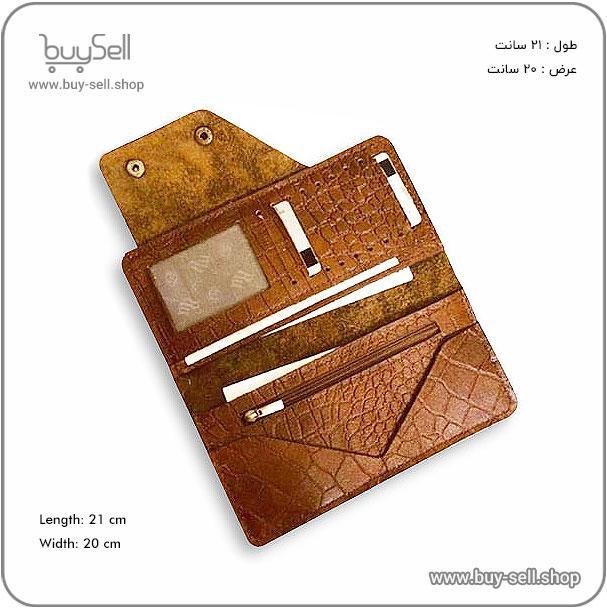
When preparing CDR files for universal leather design applications, selecting the appropriate export format is crucial for maintaining compatibility across different software platforms and manufacturing systems. While CorelDRAW files are powerful for design work, exporting to universally recognized formats ensures that your leather designs can be accessed by production teams, laser cutting equipment, and embossing machines regardless of their software environment. The most reliable formats for leather industry workflows include PDF, EPS, and AI files, each offering specific advantages. PDF files preserve vector quality while being accessible on virtually any device, making them ideal for client presentations and production documentation. EPS files maintain excellent vector integrity and are widely supported by industrial cutting systems used in leather manufacturing. Adobe Illustrator files provide seamless integration with other design software commonly used in fashion and accessory industries, ensuring that your leather patterns and designs remain editable across collaborative workflows.
Proper resolution and color mode settings are fundamental to achieving accurate representation of leather designs across different output methods. For vector-based leather patterns destined for cutting or embossing equipment, maintaining true vector format without rasterization is essential, as this preserves the mathematical precision required for automated manufacturing processes. However, when designs include textural elements or photographic leather samples, resolution becomes critical. A minimum of 300 dots per inch ensures that any raster elements within your design will reproduce clearly in both digital and physical formats. Color mode selection directly impacts how your leather designs appear in production. CMYK color mode should be used for designs intended for printing on leather or synthetic materials, as this matches the color mixing method used by commercial printers. For designs meant exclusively for cutting, embossing, or digital display, RGB color mode may be more appropriate. Converting between color modes during export can cause unexpected color shifts, particularly in rich browns, tans, and blacks common in leather work, so establishing the correct color mode from the project's inception prevents compatibility issues down the production line.
Typography presents one of the most common compatibility challenges when sharing CDR files across different systems, particularly in leather branding and monogramming applications. When exporting leather designs that include text elements such as logos, brand names, or decorative lettering, converting all text to curves or outlines is the most reliable method for ensuring universal compatibility. This process transforms editable text into vector shapes, eliminating the dependency on specific font files that may not be available on recipient systems. While this conversion prevents future text editing, it guarantees that your carefully chosen typography will appear exactly as intended whether the file is opened in different CorelDRAW versions, alternative vector software, or loaded into automated leather tooling equipment. For projects requiring ongoing text editability, embedding fonts within exported PDF files offers a compromise solution, though this method requires verification that the receiving system supports embedded fonts. Documentation accompanying your exported files should clearly indicate whether fonts have been converted to curves, which fonts were used in the original design, and any specific requirements for maintaining text appearance. This attention to font handling ensures that branded leather goods, custom embossing designs, and decorative elements maintain their professional appearance throughout the entire production workflow.
Proper layer organization before export significantly improves compatibility and usability of leather design files across different production environments. Leather manufacturing often requires separating design elements by production method, with cutting lines, embossing patterns, and decorative elements each requiring distinct handling. Organizing these elements into clearly named layers within your CDR file allows production teams to selectively export only the components relevant to their specific manufacturing stage. When exporting for universal compatibility, maintaining layer structure in formats that support it, such as PDF and AI files, preserves this organizational logic. Alternatively, creating separate export files for each production process ensures absolute clarity, with one file containing only cutting paths, another for embossing patterns, and additional files for color printing or finishing details. This methodical approach to layer management and export prevents production errors, reduces material waste, and ensures that complex leather designs translate accurately from digital concept to finished product.

 Saeede Bayat
May 04, 2025
 Saeede Bayat
Apr 28, 2025

 Buy Sell
Apr 20, 2025
 Saeede Bayat
Apr 23, 2025
 Buy Sell
Oct 25, 2025
Subscribe to the Buy Sell newsletter and enjoy its benefits.