


No products in the cart.

Explore the core standards and principles for creating universally compatible CDR files that work across different platforms and users.
In the context of digital design and manufacturing, particularly for leather goods, a CDR file is a proprietary vector graphics file created by CorelDRAW. The .cdr extension stands for CorelDRAW Drawing. Unlike raster images (like JPEGs or PNGs) made of pixels, vector files are composed of mathematical paths, points, and curves. This fundamental structure allows designs to be scaled to any size without any loss of quality, making CDR files the preferred format for creating precise patterns, logos, and intricate decorative elements that will be cut, embossed, or printed onto leather. For a leather artisan or manufacturer, a CDR file is often the master blueprint from which physical products are born, ensuring consistency and accuracy from digital concept to finished goods like wallets, bags, and belts.
Understanding the internal makeup of a CDR file helps explain its versatility and power in leather design. At its heart, the file contains object data. Each line, shape, or text block is an independent object defined by anchor points and Bézier curves, which can be individually manipulated. This object-oriented approach is crucial for adjusting pattern pieces or decorative filigree. The file also stores extensive metadata, including layer information, color palettes (like Pantone or CMYK codes vital for dye matching), fonts, and page settings. Furthermore, CDR files can embed raster images, enabling designers to combine detailed photographic textures or logos with crisp vector outlines. This layered, object-based structure is non-destructive, meaning elements can be edited, repositioned, or removed without affecting the rest of the design, providing immense flexibility during the product development phase.
Product purchase offer: Bracelet and accessory pattern
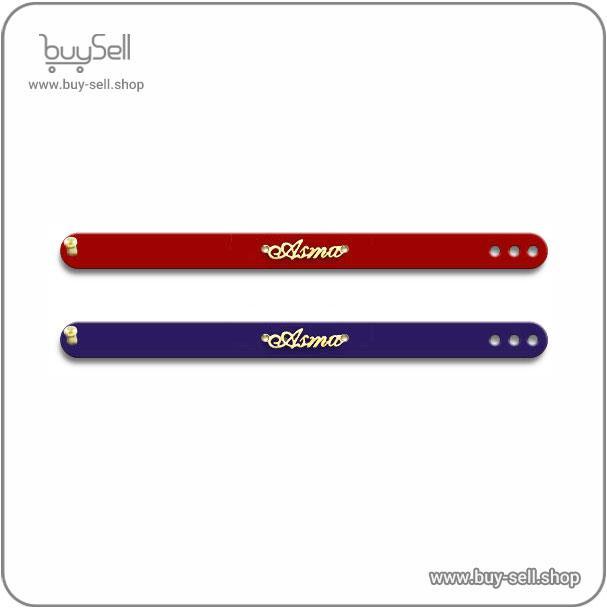
The practical use of CDR files spans the entire leather production workflow. The journey typically begins with concept art and technical drawing. Designers use CorelDRAW’s tools to draft precise pattern pieces, ensuring every panel for a bag or holster is shaped correctly and includes necessary seam allowances. These vector patterns can be sent directly to computer-controlled cutting machines (like laser or CNC cutters), which read the paths in the CDR file to cut leather with exceptional accuracy and repeatability. For decoration, the files guide:
This digital-to-physical pipeline minimizes material waste and ensures every produced item matches the original design specifications perfectly.
A primary consideration when working with CDR files is software compatibility. As a native CorelDRAW format, it is best opened and edited within Corel's software suite. However, other vector programs like Adobe Illustrator can import certain versions of CDR files, though complex effects or fonts may not translate perfectly. Therefore, a standard industry practice is to export final designs to more universal vector formats for sharing or machine interfacing. Common export formats include:
Best practices for managing CDR files involve maintaining an organized layer structure, converting all text to curves (outlines) to preserve font appearance on other systems, and embedding linked raster images to ensure the file is self-contained. Always keeping a master .cdr version allows for future edits, while exported formats act as locked, production-ready versions.
Several frequent mistakes can disrupt a smooth leather production process when using CDR files. One major issue is using outdated software versions; a CDR file saved in a newer CorelDRAW version may not open correctly in an older one, potentially stalling collaboration or production. The solution is to agree on a common software version with partners or use a stable export format like PDF. Another pitfall is neglecting to outline fonts. If a design uses a specific typeface not installed on the cutter or printer's computer, the text may default to a different font, ruining a logo or label. Converting text to curves eliminates this dependency. Furthermore, overly complex paths with thousands of nodes can cause cutting machines to stutter or software to crash. Using the software's tools to simplify curves and reduce nodes without losing essential detail is a key technical skill. Finally, failing to properly set color modes—using RGB for print processes that require CMYK—can lead to unexpected and inaccurate color results on the final leather product.
Product purchase offer: leather bag pattern

In the context of web and software development, universal compatibility refers to the ability of a product, system, or component to function correctly across different environments, browsers, operating systems, and devices without requiring significant modification. Achieving this is not a singular task but relies on adherence to a set of established, industry-agreed-upon specifications. These key standards form a framework that developers and manufacturers follow to ensure interoperability, consistency, and a seamless user experience. This framework is built upon foundational protocols like HTML for structure, CSS for presentation, and JavaScript for behavior, all maintained by international bodies such as the World Wide Web Consortium (W3C). By designing and building within these guardrails, creators ensure their work can be interpreted and rendered correctly by a vast array of client software, from a legacy desktop browser to a modern mobile application.
Beyond the visual layer, deep interoperability requires strict adherence to communication and data exchange standards. Two of the most critical are RESTful APIs and the JSON data format. REST (Representational State Transfer) defines a set of architectural principles for designing networked applications. APIs built on these principles use standard HTTP methods (GET, POST, PUT, DELETE) to perform operations, making them predictable and easily consumable by any system that understands HTTP. JSON (JavaScript Object Notation) serves as the nearly universal language for data interchange. Its lightweight, text-based, and human-readable structure is natively parsed by virtually all programming languages. When a mobile app sends a request to a cloud server, it is these protocols—a RESTful call returning a JSON packet—that enable the smooth transfer of information. Furthermore, security standards like OAuth 2.0 for authorization provide a standardized method for secure access delegation, allowing users to grant one application limited access to their data in another without sharing credentials.
Despite the existence of clear standards, compatibility is often broken by common development oversights. One major pitfall is relying on proprietary or browser-specific features without providing fallbacks. Using a CSS property that only works in one browser engine will create a broken experience for others. Another frequent mistake is failing to implement responsive design principles, which causes layouts to fail on different screen sizes. Neglecting to set correct character encoding (like UTF-8) can render text unreadable across systems. Furthermore, hard-coded assumptions about user environments—such as specific screen dimensions, plugin availability, or processing power—are a primary source of failure. Developers must also avoid "vendor lock-in" by using open standards instead of closed, proprietary systems for core functionality. A checklist for prevention includes: validating code against W3C standards, testing on multiple browsers and devices early and often, using progressive enhancement (building a baseline experience first), and employing feature detection libraries to adapt gracefully when advanced features are unavailable.
Adherence to standards is not a one-time action but an ongoing process enforced through rigorous testing. Continuous validation is the practical engine that drives universal compatibility. This involves several layers: syntax validation tools check HTML, CSS, and code against the formal specifications to catch errors. Cross-browser testing platforms, both automated and manual, are used to visually and functionally verify that an application behaves as intended across a defined matrix of browsers, versions, and operating systems. Performance benchmarking ensures that the experience remains acceptable on lower-powered devices. Accessibility testing, guided by standards like the Web Content Accessibility Guidelines (WCAG), ensures compatibility with assistive technologies such as screen readers. By integrating these validation steps directly into the development lifecycle, teams can identify and rectify compatibility issues as they arise, preventing them from reaching the end-user and undermining the universal access goal.
The technical foundation of any leather product begins with two pivotal specifications: the tanning method and the substance or thickness. Tanning is the chemical process that converts raw animal hides into durable, non-perishable leather. The primary methods include vegetable tanning, which uses natural tannins from plant matter and results in a firm, moldable leather that patinas beautifully, and chrome tanning, which employs chromium salts to produce softer, more water-resistant, and pliable leather much faster. A third, modern method is combination tanning, which blends both approaches to harness specific benefits from each. Alongside tanning, substance—measured in millimeters or ounces—is critical. This refers to the thickness of the leather once it has been trimmed and finished. A higher substance indicates a thicker, heavier, and more robust leather suitable for belts, saddles, or structural bags, while a lower substance yields a softer, more supple material ideal for garments or delicate accessories.
Not all leather is created equal, and technical grading separates premium material from lower-quality cuts. The highest grade is Full-Grain Leather, which includes the entire original grain layer of the hide, complete with its natural markings and pores. It is the strongest and most durable, developing a unique character over time. Top-Grain Leather is slightly sanded to remove surface imperfections, making it more uniform but slightly less robust. Corrected-Grain Leather has been sanded significantly and is often embossed with an artificial grain pattern, while Bonded Leather is a composite of shredded leather fibers bonded with adhesive. The finish is another key specification, describing the final surface treatment. An aniline finish penetrates deeply, showing the hide's natural character, while a semi-aniline finish adds a light protective pigment. A pigmented or protected finish applies a thicker coating, offering uniformity and high resistance to stains and scuffs but masking the natural feel.
Product purchase offer: Leather pattern
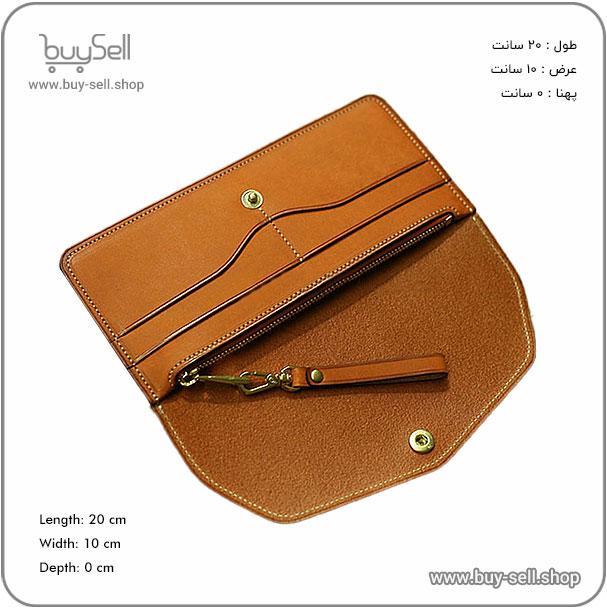
For functional leather goods, performance under stress is paramount. Tensile strength is a fundamental metric, measuring the force required to stretch the material to its breaking point. It is directly influenced by the fiber structure of the hide, the tanning process, and the substance. A high tensile strength is essential for items like hiking boots, luggage, and equestrian gear. Related to this is tear strength, which indicates resistance to propagating a nick or cut. Water resistance, often confused with waterproofing, is another vital specification. Few leathers are truly waterproof without specialized treatment. Water resistance refers to a leather's ability to repel water for a period, typically achieved through treatments like waxing, oiling, or specialized sealants in the finish. The trade-off is that treatments enhancing water resistance can sometimes reduce breathability, a key property for footwear. Understanding these specifications allows for informed material selection based on intended use.
The origin and size of the raw hide are technical details with significant practical implications. Leather is sourced from various animals, primarily bovine (cattle), but also ovine (sheep), caprine (goat), and exotic species. Each species imparts distinct characteristics: bovine is thick and strong, ovine is soft and pliable, and caprine offers a fine, pebbled grain. The measurement of hides is not by simple length and width but by area. The global standard is the square foot (or square decimeter in metric regions). Hides are irregularly shaped, so suppliers measure total usable area. When a manufacturer orders leather, they specify the required square footage, which directly impacts yield, cost, and cutting efficiency. Knowing the approximate area yield from a hide helps in project planning and cost estimation, making it an essential commercial and technical specification.
In summary, moving beyond simple aesthetic descriptions to analyze essential technical specifications empowers both makers and consumers. By understanding the interplay between tanning methods, substance, grain integrity, physical performance metrics, and sourcing logistics, one can accurately predict a leather's behavior, longevity, and suitability for any given application. This knowledge transforms leather from a mere material into a predictable and reliable engineering component for products built to last.
Proper file preparation begins with a fundamental understanding of digital formats and their impact on the final physical product. For leather crafting, particularly laser engraving, die-cutting, or digital printing, the choice between vector and raster graphics is critical. Vector files, such as those in .AI, .EPS, or .SVG formats, use mathematical paths and are infinitely scalable without quality loss, making them ideal for clean logos, text, and precise cut lines. Raster files, like .JPG or .PNG, are composed of pixels and are resolution-dependent; they are suitable for detailed photographic images but must be supplied at a high enough resolution to avoid pixelation. A universal best practice is to provide artwork at a minimum of 300 DPI (dots per inch) at the final intended output size for raster elements, while vector artwork should have all text converted to outlines or paths to ensure font integrity across different systems.
A well-organized file package streamlines the production process and minimizes errors. Your submission should logically separate different elements onto labeled layers or within distinctly named files. For instance, a typical package for a custom leather wallet might include: a file for the overall cut shape, a separate file for any interior slit or window cut lines, another for deboss/emboss areas, and a final one for color-fill engraving graphics. Clearly naming these files (e.g., "Wallet_Outline_Cut.ai", "Wallet_Deboss_Lines.ai") provides immediate clarity. Furthermore, within a single vector file, use layers to organize elements—keeping cut lines on one layer, engrave lines on another, and raster images on a third. This structure allows the machine operator to easily toggle elements on and off, assigning the correct power and speed settings for each process, whether it's a full-power cut or a light surface engrave.
Many production delays and subpar results stem from easily avoidable mistakes in the file preparation stage. One frequent error is neglecting to account for material thickness in designs for folded or assembled items, leading to misaligned stitching holes or panels. Another is using non-continuous or open paths for cut lines; all cut vectors must form complete, closed shapes. Stray anchor points, duplicate lines, and overly complex paths can also cause processing errors or erratic machine movement. A crucial pre-submission checklist should include:
This proactive approach prevents ambiguity and ensures the digital design translates perfectly onto the leather medium.
The final, often overlooked, best practice is establishing clear communication and proofing stages with your manufacturer or laser service. Before any material is committed, always request a digital proof—a visual preview of how the file will be interpreted by the production equipment. This step can reveal scaling issues, hidden layers, or incorrect line assignments. Furthermore, discuss material specifics; a design prepared for vegetable-tanned leather may need adjustments for suede or chrome-tanned hides due to different burning and stretching characteristics. Providing a small physical sample of your target leather alongside your files can be invaluable. By treating file preparation as a collaborative, iterative process grounded in technical clarity and organized data, you lay the groundwork for efficient production and a flawless leather product that accurately reflects your original vision.
In our interconnected digital world, data is generated and stored in countless formats and systems. This fragmentation creates significant barriers. Universal Call Detail Record (CDR) file creation standards are designed to dismantle these barriers by establishing a common language for data. CDRs are detailed logs of telecommunication transactions, but the principle of standardized record-keeping applies broadly. When every system adheres to the same creation standards, the resulting files can be read, processed, and analyzed across different software platforms, operating systems, and organizational boundaries. This eliminates vendor lock-in and ensures that valuable data is not trapped in a proprietary silo, becoming inaccessible or useless when switching tools or collaborating with partners who use different technologies.
For a standard to be truly cross-platform, it must be built on foundational principles that prioritize accessibility. First, it must be open and non-proprietary, allowing any developer or organization to implement it without licensing restrictions. Second, the technical specification should use widely adopted, human-readable formats like XML or JSON, which are supported by virtually every modern programming language and database system. Third, the standard must be well-documented, with clear definitions for every field and data point. For instance, a field labeled "timestamp" must have an unambiguous format (e.g., ISO 8601) so that a system in New York and a system in Tokyo interpret it identically. This clarity is as crucial as understanding a technical term like 2FA (Two-Factor Authentication), which is a security process requiring two different forms of verification to access an account.
Adopting universal standards requires deliberate action at both the technical and organizational levels. Technically, systems must be configured or updated to generate output files that strictly comply with the agreed-upon schema. This involves mapping internal data labels to the standard's field names and ensuring data integrity during export. Organizationally, it mandates policy alignment. Companies and service providers must commit to using the standard in their data exchange agreements. This is similar to how the concept of a Seed Phrase—a set of words that stores all the information needed to recover a cryptocurrency wallet—has become a standard for portability in blockchain, allowing users to access their assets from different wallet applications. Universal CDR standards aim for the same portability for data logs.
The ultimate payoff of cross-platform accessibility is empowerment and efficiency. For individual users, it means ownership and control of their data. They can easily migrate their information from one service provider to another without loss or corruption. For analysts and auditors, it simplifies the process of aggregating and comparing data from multiple sources, leading to more accurate insights and reporting. For regulatory bodies, it enables more straightforward compliance monitoring, as data is submitted in a consistent, predictable format. Furthermore, it future-proofs data archives. A CDR file created today using a universal open standard will remain accessible and usable decades from now, regardless of how technology evolves, preserving its value and utility far into the future.
follow us in telegram & instagram
Despite the clear benefits, widespread adoption faces challenges. Legacy systems may require costly upgrades or middleware to comply. There may be resistance from entities that benefit from proprietary, locked-in ecosystems. Overcoming these hurdles involves demonstrating the long-term cost savings, competitive advantage, and risk reduction that standards provide. Industry consortia and regulatory guidance can accelerate this shift. The goal is to make cross-platform accessibility the default expectation, not an optional feature, ensuring that universal CDR file creation standards truly live up to their name and serve everyone.

 Saeede Bayat
May 04, 2025

 Buy Sell
Apr 20, 2025
 Saeede Bayat
Apr 28, 2025
 Saeede Bayat
Apr 23, 2025
 Buy Sell
Oct 25, 2025

Subscribe to the Buy Sell newsletter and enjoy its benefits.